your XP start faster than before.........
Just do it as given below.........
Go to....Start->run and type regedit...Press enter..
Now navigate to........
HKEY_LOCAL_MACHINE\SYSTEM\currentControlSet\Control\Session Manager\Memory Management\PrefetchParameters
Now click on PrefetchParameters and see a list has been displayed on the right side.....
Setect EnablePrefetcher and right click on it........and select modify.
See default value is 3..........Change it to 5 and click ok....U have done your job........
Just Enjoy..........Faster Boot......
Tuesday, December 9, 2008

USb as Network
Hi...Friends.........
USB, also known as Universal Serial Bus, is one of the most useful computer-related technologies ever developed.
USB is used to connect printers, keyboards, digital cameras and even MP3 players to your computer.
But you can also connect two computers using USB...Want to know how..
Then Here it is.....
Step 1>Turn on both of the computers. Log in to Windows using an account with administrator privileges.
Step 2>Insert one end of the USB bridge cable into a USB slot on one computer, and the other end of the bridge into the second computer.
Step 3>Install the driver software for the USB bridge cable when the computers prompt you to do so. If you do not have driver software for the USB bridge cable, you may be able to download it from the cable manufacturer.
Step 4>Choose to install the USB bridge cable either as a link adapter or a network adapter. If you install it as a link adapter, you will only be able to transfer files back and forth. If you install it as a network adapter, you will have full network functionality.
Step 5>Complete the software installation. Your two computers should now be connected.
Happy File Transfer.......
USB, also known as Universal Serial Bus, is one of the most useful computer-related technologies ever developed.
USB is used to connect printers, keyboards, digital cameras and even MP3 players to your computer.
But you can also connect two computers using USB...Want to know how..
Then Here it is.....
Step 1>Turn on both of the computers. Log in to Windows using an account with administrator privileges.
Step 2>Insert one end of the USB bridge cable into a USB slot on one computer, and the other end of the bridge into the second computer.
Step 3>Install the driver software for the USB bridge cable when the computers prompt you to do so. If you do not have driver software for the USB bridge cable, you may be able to download it from the cable manufacturer.
Step 4>Choose to install the USB bridge cable either as a link adapter or a network adapter. If you install it as a link adapter, you will only be able to transfer files back and forth. If you install it as a network adapter, you will have full network functionality.
Step 5>Complete the software installation. Your two computers should now be connected.
Happy File Transfer.......
Thursday, October 30, 2008
Quality Free Resources
Quality Free Resources
The web offers a lot of free resources for designers, but they are not all created equal. I wanted to put together my own list of free resources and goodies. If you know of anymore please let me know and I will add it to the list.
Keepdesigning.com (Images and vectors)


Blog.spoongraphics.co.uk (Images and vectors)


Vecteezy.com (Images and vectors)


Videocopilot.com (After Effects projects and presets)


Graymachine.com (After Effects projects and presets)


Demystifying Video Sizes
Demystifying Video Sizes
I hope this chart will help you to understand the differences between the many video size standards available. NTSC is missing for some reason, but I suppose it could fall under the VGA (640×480) category. NTSC is 720×480 with a pixel aspect ratio of 0.9 giving it a video resolution of 648×480.
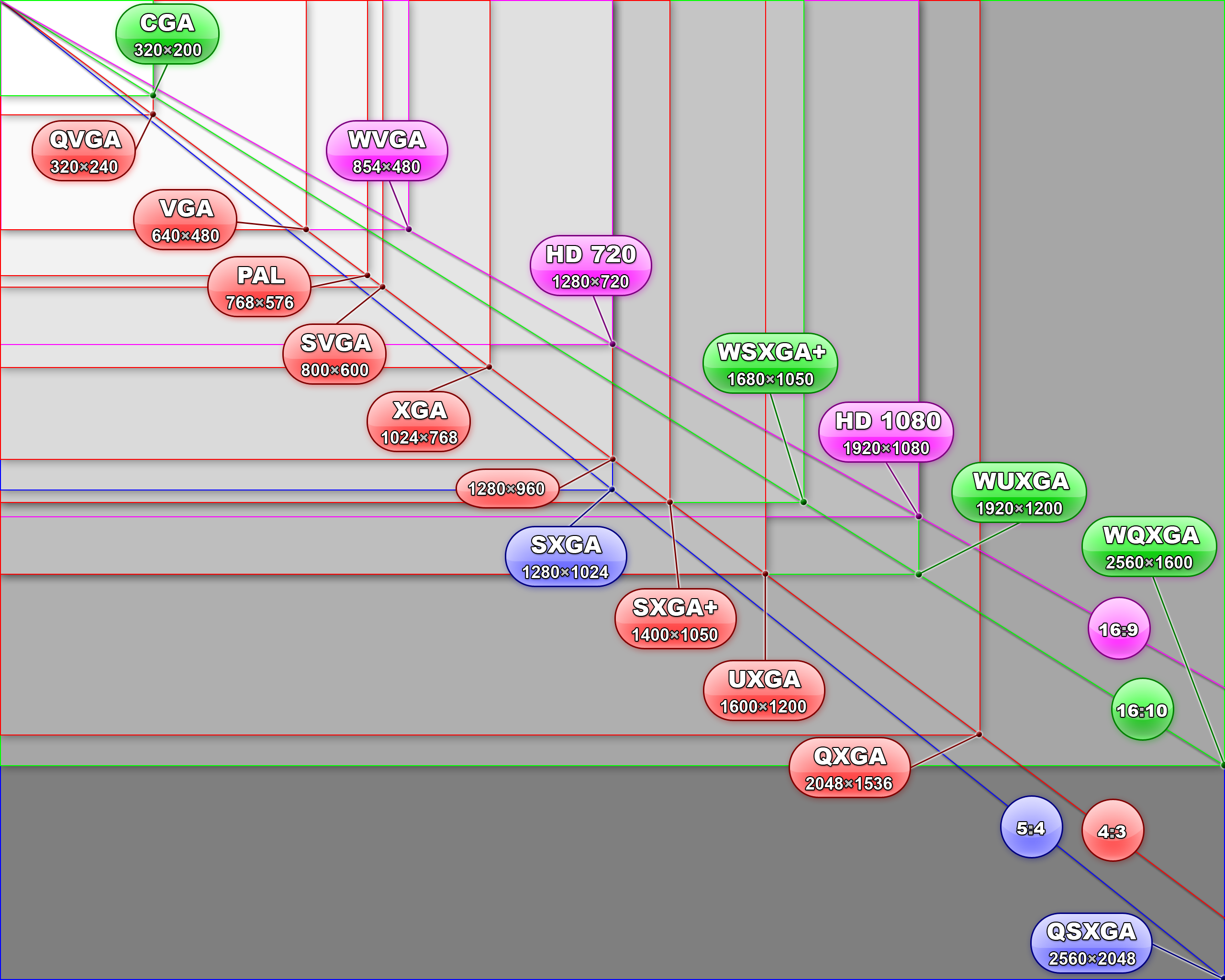
This chart demonstration the magnatude of standard definition footage to higher resolution footage.

9 Places for After Effects Tutorials
9 Places for After Effects Tutorials
1. Ayato@web
Ayato Fujii from Japan is the producer of this fantastic resource and has provided over 50 exceptional After Effects tutorials with step-by-step instruction, screen shots and video previews. A moderate understanding of After Effects is required to complete these tutorials and many of them require third party plug-ins from Trapcode and Red Giant Software.
2. VideoCopilot
Andrew Kramer from the USA is the producer and host of over 70 After Effects all screen-casted for easy reference. Andrew has kindly included the sources files for most of the tutorials however some of them require third party plug-ins or rely on other visual effects software.
3. Layers
The fine people at the Adobe Layers magazine have been posting an assortment of After Effects tutorials and have a collection of about 30 now. The tutorials come as either screen-casts or written documents and will inspire both the begginner and intermediate. Tutorials for CS4 are becoming more prominent on the site and of course the integration of Illustrator and Photoshop are showcased as well.
4. Pixel2Life
This is a portal for an assortment of different tutorials provided by many different designers. The site boasts around 100 tutorials ranging from animation, text effects, video correction and audio. With so much to choose from it is a good starting place for anyone looking for tutorials.
5. CGArena
Despite only having 9 tutorials, CGArena is a diamond in the ruff. It holds many interesting tutorials created by different designers in screen-cast and written form. Some even include the source files so check it out and you might find something you like.
6. Graymachine
Harry J Frank is a After Effects and scripting wizard and has provided almost 2 dozen tutorials that look at the finer details of the program and the third party plug-ins we know and love.
7. Rhys Works
Rhys Enniks is an up and coming designer from the UK who is producing some one of a kind After Effects tutorials. His collection consists of a dozen or so screen-casts and most them rely heavily on the Trapcode Particular plug-in. His tutorilas are getting literally tens of thousands of hits and his site is defiantly worth the click.
8. Designer Today
This is my second least favorite site out of the collection because it lacks thumbnails showing the effect making the site very difficult to navigate. Its collection of over 150 tutorials seems impressive, but once you drill down inside of them you start to realize that a lot of them are outdated. Learn at your own risk.
9. Creative COW
My least favorite place for After Effects tutorials is Creative COW. Its endless pages with poorly designed thumbnails, oddly shaped advertisements, unnecessary text, red coloured headings and blue coloured links make me run for the hills whenever looking for a specific tutorial.
General Graphics Format Questions+Image Conversion and Display Programs+Where to Get File Format Specifications+ Tips and Tricks of the Trade
This summary is not available. Please
click here to view the post.
Subscribe to:
Posts (Atom)